Agentic ERP: AI Agents in Dynamics 365 Business Central
Agentic ERP explained: how AI agents can support finance, inventory and sales workflows in Dynamics 365 Business Central, with controls and approvals.
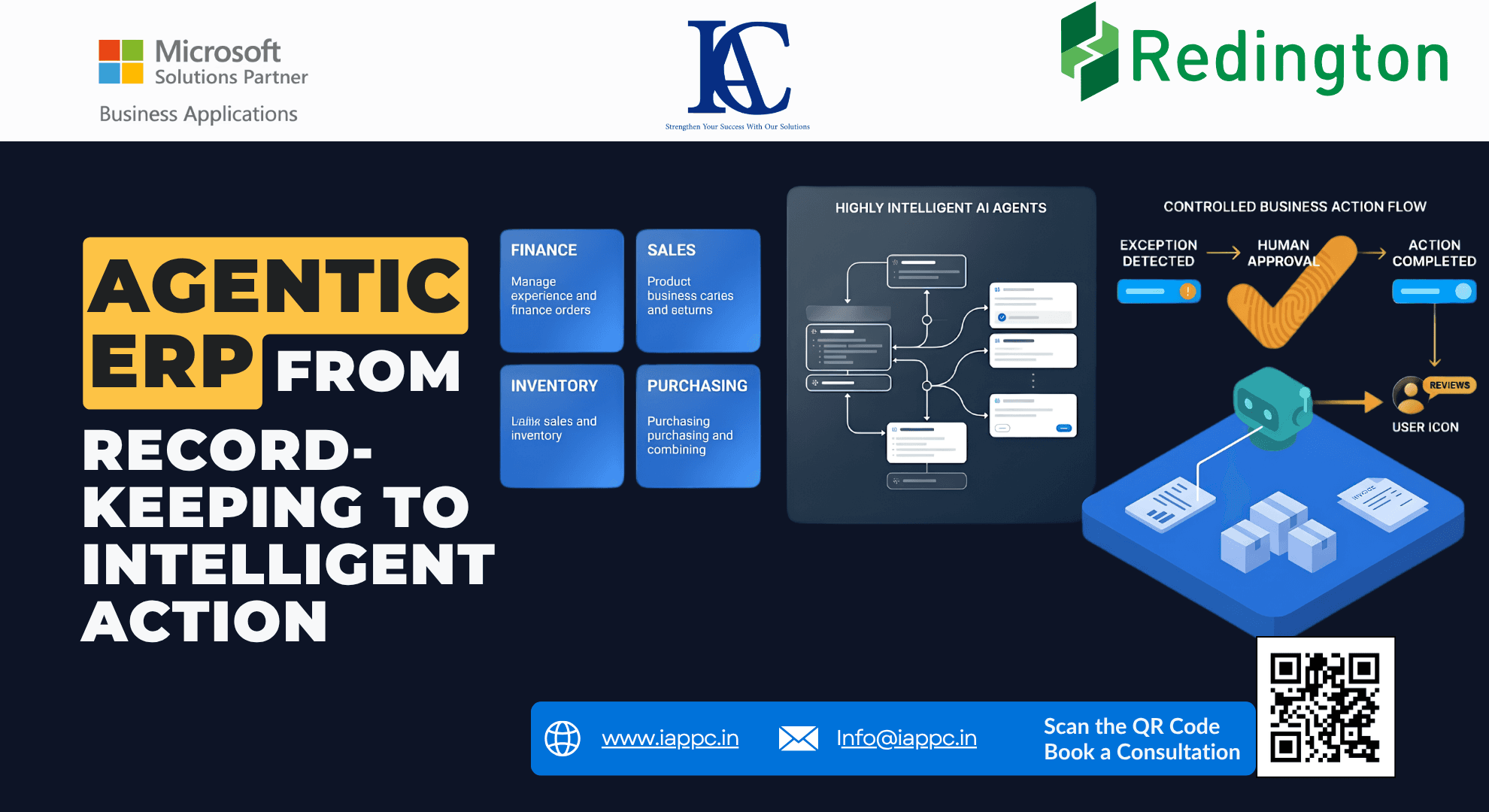
ERP Is Moving Beyond Record-Keeping
Agentic ERP means ERP systems where AI agents help carry defined business tasks to completion, inside set permissions and approvals. It's a shift from software that stores what happened to software that helps with what happens next.
Businesses have long used ERP to manage financial records, inventory, purchasing, sales orders and operational data. But keeping records is only part of running a company. Teams still lose real time checking information, chasing pending tasks, reconciling entries and coordinating decisions across departments.
AI is starting to change that.
If you're on Microsoft Dynamics 365 Business Central, there's now a practical way to connect your business data with intelligent automation, so everyday operations respond faster.
What Is Agentic ERP?
A traditional ERP records transactions, applies business rules and holds your operational data. Agentic ERP builds on that by adding AI agents that help with specific tasks and workflows.
What an agent can do depends on its configuration, its data access and its permissions. Typical examples:
Spotting exceptions in financial or operational data
Helping with invoice reconciliation and transaction reviews
Flagging inventory shortages or odd purchasing patterns
Supporting sales-order processing and routine follow-ups
Passing work between connected business applications
Sending a decision to a person whenever review or approval is needed
The key difference is this: an agent doesn't just give you an answer. It can help push a defined process toward done.
It still shouldn't run without boundaries. Business rules, access permissions, approval steps and reliable data have to govern what it does.
Why AI Agents Need an ERP Foundation
An AI tool can summarize a spreadsheet or answer a question. Running a business takes more than answers.
Picture a distributor that gets a sales order for products with limited stock. Someone has to work out what's actually available, whether that stock is already reserved for other customers, whether purchasing needs to step in, and whether the delivery date can still be met.
Every one of those decisions depends on connected, accurate data. Your ERP holds the transaction records, the inventory position, the financial context and the business rules an agent needs to help.
That's why an agent isn't a replacement for ERP. It's more useful when it sits on top of a reliable system of record, and much less useful when it doesn't.
Four Areas Where AI Agents Can Support ERP Operations
1. Finance and Accounts
Finance teams do a lot of repetitive checking: outstanding transactions, reconciliations, payment follow-ups.
Agents can surface exceptions, gather the relevant information, prepare summaries and route items for review. With the right integrations and permissions, they can also take defined workflow actions.
The point isn't to weaken financial controls. It's to cut repetitive work while keeping every decision traceable and supervised.
2. Sales and Order Management
A sales order touches a lot of hands: customer details, stock checks, fulfilment, invoicing.
An AI-enabled workflow can validate incoming information, flag what's missing, catch likely exceptions, and line up the next step. Built around Dynamics 365 Business Central, it can follow your real sales and inventory process rather than a generic one.
You end up with fewer manual hand-offs and a clearer view of what's still pending.
3. Inventory and Purchasing
A stock problem rarely stays in the warehouse. A shortage can hit purchasing, delivery schedules, customer promises, and working capital all at once.
Agents can surface low-stock conditions, notice unusual demand, summarize supplier exceptions and prepare recommendations for the purchasing team. Any actual purchase should still follow your approval rules and inventory policies.
Put operational data, AI analysis, and controlled execution together, and you can react to disruption earlier.
4. Reporting and Business Decisions
Leaders want quick answers on sales, cash flow, stock movement, receivables and bottlenecks.
AI can let people ask for that in plain language, summarize trends and point to what needs attention. But the answer is only as good as the data behind it, the definitions you use and who's allowed to see what.
Treat AI summaries as a complement to proper reporting. Don't skip the check.
Microsoft's Direction: From Copilots to AI Agents
Microsoft's October 15, 2026 article on its recognition as a Leader in the 2026 IDC MarketScape for AI-Enabled Operational ERP points to a bigger role for agents in enterprise operations.
It describes Dynamics 365, Microsoft 365 Copilot, Power Platform, Azure and connected business data working together to bring AI into daily workflows. It also covers agents for procurement, account reconciliation, time entry, expenses and activity approvals, plus tools for building custom ones.
Availability varies by product, release and configuration, so check what fits your environment before you plan a rollout.
Still, the direction is clear. ERP won't just record transactions. It'll connect context, decisions and controlled action.
Our View: Automating a Task Isn't Improving a Process
At Innovative TechPlus, we'd rather start from your operations than from the technology.
Drop an agent into a weak workflow and the workflow doesn't get better. It gets faster. If your inventory data is unreliable, your approvals are unclear, or sales and finance run on disconnected processes, AI will speed up those problems.
So here's how we'd approach it:
Find the repetitive tasks and the bottlenecks.
Get the data reliable and the business rules clear.
Connect the ERP modules and applications involved.
Add AI help to workflows that are well defined and suitable.
Keep people in charge of sensitive decisions and exceptions.
Measure the result: processing time, error rates, visibility, performance.
That way you're adopting AI for a reason, not because it happens to be available.
How Innovative TechPlus Can Help
We work with businesses on Microsoft Dynamics 365 Business Central, AI solutions, workflow automation and application integration. What we care about is the link between the technology and the processes you run every day.
Depending on what you need, that could mean improving finance and inventory workflows, connecting sales operations to your ERP, building AI-powered reporting, or working out where an agent could support one defined process.
We start by understanding the workflow, the data it relies on, and the decisions that must stay with you.
Conclusion
Agentic ERP shifts enterprise software from recording business activity toward connected workflows that help people interpret information and act on it.
Agents don't remove the need for reliable ERP data, well-designed processes or human accountability. Get those right first and AI becomes genuinely useful.
So the question isn't whether your business should use AI. It's which of your processes are ready for controlled automation.
Want help modernizing your ERP and business workflows? Talk to Innovative TechPlus.
Website: https://www.iappc.in
Email: Info@iappc.in